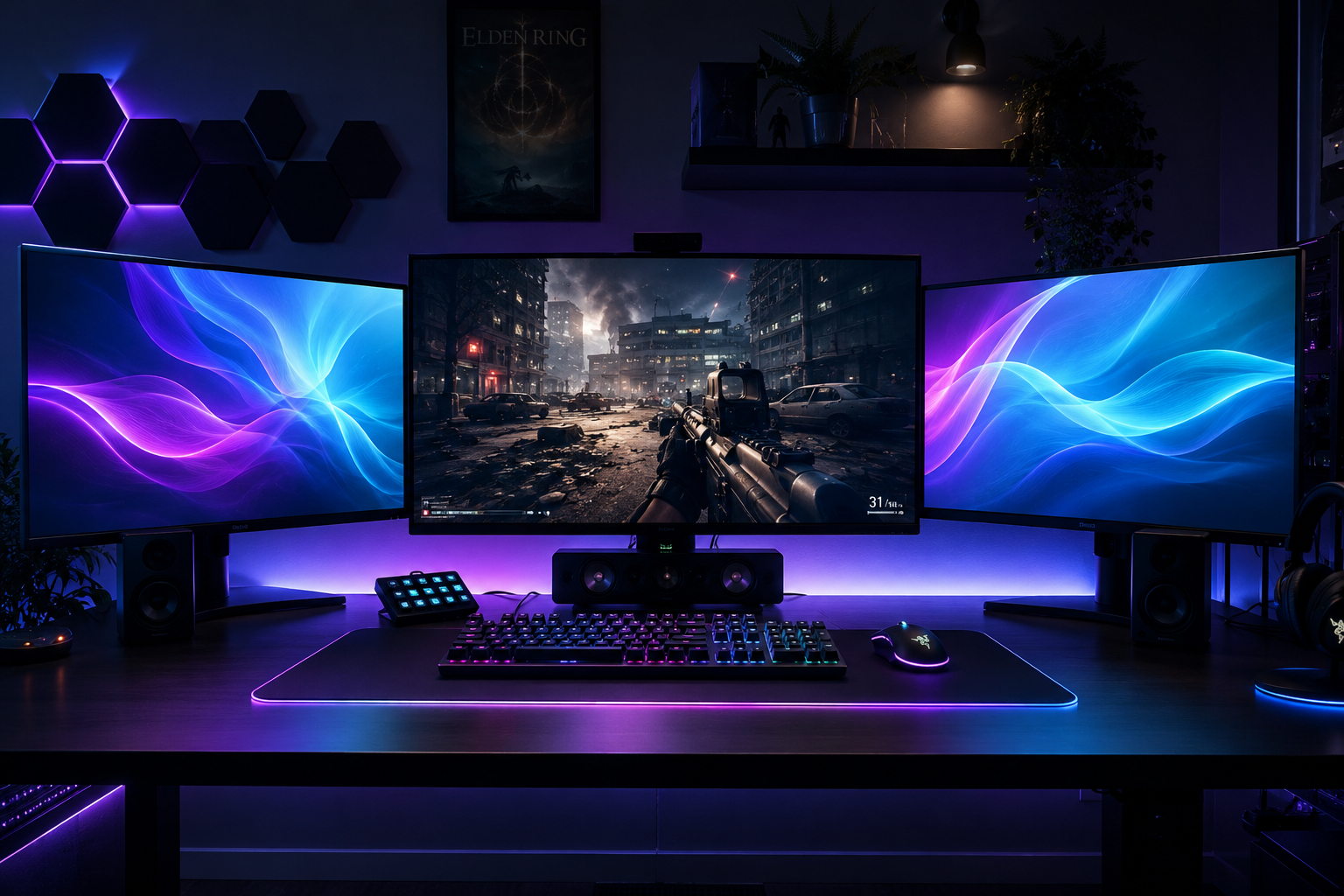
For multi-monitor setups

Your secondary monitor
doesn't have to go dark.

DemShade fills the empty screens around your game with ambient light, generated live on your GPU. It turns on when you go fullscreen. It turns off when you don't.

Windows 10/11 · 64-bit · ~15 MB · no subscription
DemShade
The problem

Right now you're stuck with two bad options.

When you go fullscreen on your main monitor, what happens to the rest of your screens depends on your setup — and neither of today's default behaviors is comfortable for long sessions.

Option 1

Blank screen

Solid black next to a bright game. The contrast tires your eyes out over long sessions.

Option 2

Static desktop

Icons, windows, notifications — all sitting in the corner of your eye, pulling focus from the game.

With DemShade

Ambient light

Smooth, subtle animation, generated on your GPU. Your eyes rest, your focus stays on the game.

How it works

Three steps. Zero clicks.

DemShade runs in your tray and reacts on its own to what's happening on your main monitor.

01 — Detect

Watches for fullscreen

The moment a game goes exclusive or borderless fullscreen on your main monitor, DemShade detects it automatically — no setup required.

02 — Activate

Switches your monitors

Secondary screens instantly switch to the shader from your active profile — or to a classic mode: static color, image, or solid black.

03 — Restore

Hands control back

Quit the game or minimize it, and your monitors return to normal instantly. Nothing to close manually.

Features

Everything you need, without a complicated interface.

🎮

Automatic detection

Turns on and off based on what you're playing — no keybinds or rules to configure.

🌀

6 built-in GLSL shaders

Smooth, GPU-accelerated effects, plus classic modes: static color, custom image, solid black.

🔊

Audio-reactive

Effects pulse in time with your system sound. 100% local processing — nothing recorded, nothing sent anywhere.

🖥️

Per-monitor control

Each screen gets its own mode and its own opacity, independent of the others.

📁

Saved profiles

Switch instantly between full setups — "Streaming," "Relaxing," "Competitive."

Scheduling

Profiles that activate automatically by time of day, or when a specific game or app launches.

⌨️

Global hotkeys

Toggle and adjust on the fly without ever opening the app window.

🧩

Custom shaders

Import your own .glsl or .frag files and run them directly in DemShade.

📊

System stats overlay

Optional CPU, RAM, and GPU readout, layered right on top of the ambient display.

Profiles

A profile for every kind of session.

Save a full configuration once, then switch between them in one click or one hotkey.

Streaming

Warm, viewer-friendly

Warm tones, medium motion. Looks good in the corner of a stream without pulling focus from viewers.

Relaxing

Cool, slow motion

Cool tones, slow movement. Built for long sessions late at night, when your eyes tire first.

Competitive

Static, distraction-free

Switches to classic static color mode. Zero motion, zero distraction next to a fast-paced game.

Pricing

One payment. No subscription.

Free
$0
  • 1 secondary monitor
  • 2 built-in GLSL shaders
  • Automatic fullscreen detection
  • No scheduling, no hotkeys
Download Free
Pro — lifetime
€5.99 one-time
  • Unlimited secondary monitors
  • 6 GLSL shaders + custom shader import
  • Profiles, scheduling, and global hotkeys
  • System stats overlay
  • Updates included, no renewal
Get Pro — €5.99

Get your first ambient display running in under a minute.

Install it, pick a profile, go fullscreen in a game. DemShade handles the rest.

Download DemShade for Windows
WINDOWS 10 / 11 · 64-BIT GPU WITH OPENGL SUPPORT ~15 MB